Friday, November 1, 2019

Video Streaming With Raspberry Pi Camera #piday #raspberrypi @Raspberry_Pi

NewImage

Shared by navnathbam on Instructables:

In this post we’re going to show you how you can do video streaming with a Raspberry Pi and a Raspberry Pi Camera – how to stream live video into a web page that you can access in any device that has a browser and is connected to the same network the Pi is. This is useful to apply to a home surveillance camera, for example.

Learn more!


3055 06Each Friday is PiDay here at Adafruit! Be sure to check out our posts, tutorials and new Raspberry Pi related products. Adafruit has the largest and best selection of Raspberry Pi accessories and all the code & tutorials to get you up and running in no time!

Getting up an ADS-B receiver on a Raspberry PI #Raspberrypi #PiDay

Screenshot 2019 10 15 19 03 12

Setup a basic ADS-B receiver on a Raspberry PI Zero W, Via Area-51 blog

This post describes how I setup a basic ADS-B receiver on a Raspberry PI Zero W using a USB RTL2832U based Software Defined Radio so that you can see any ADS-B equipped aircraft in your local area and present it on your own website.

Equipment used

  1. Raspberry PI Zero W
  2. RPI Power supply
  3. SD card – I used a SanDisk Ultra 32GB UHS-1 card as I have a few as spares lying around but any one for a PI will do
  4. micro-B USB to USB A female cable to connect the SDR to the PI Zero
  5. Realtek RTL2832U based USB SDR. I had one on the shelf for a few years but you can get suitable ones for about £10-£20 online, think I paid about £15 for it
  6. USB keyboard, mini-HDMI to HDMI adaptor & HDMI cable (for setup only)
    Now I used a PI Zero W was I wanted something small and dedicated to this but you can use any PI for this as long as there’s a network connection available for it (so a Zero W or a PI 2B & up)

Note: In this article I use vi as the editor, but there are others – the most common one used is pico which you might be more used to – just replace vi with pico in the commands below if you want to use that editor instead.

See full project details!

DIY Outdoor Landscape Lighting #piday #raspberrypi @Raspberry_Pi

via JasonUMD77 on instructables

I have had issues with landscape lighting companies since I purchased my first townhouse in 2003. The transformers are low powered with non-intuitive push button interfaces and cheap screens where wattage seems to be more precious than platinum. Unless you enter a really high price point, the lights are extremely poor quality with scarce-to-nonexistent replacement parts (spikes). The connectors are frustrating and finicky. I have been playing with Raspberry Pi’s for a few years and thought it had to be a good basis for a lighting controller. I really wanted to roll my own solution and this became my Spring 2019 passion project for home improvement.

Read more.


3055 06Each Friday is PiDay here at Adafruit! Be sure to check out our posts, tutorials and new Raspberry Pi related products. Adafruit has the largest and best selection of Raspberry Pi accessories and all the code & tutorials to get you up and running in no time!

UPDATED GUIDE: Adafruit Sharp Memory Display Breakout @CircuitPython #Adafruit #AdafruitLearningSystem #Display @Raspberry_Pi @Adafruit @MakerMelissa

The Adafruit Sharp Memory Display Breakout guide has been updated to include setup instructions for usage through User Python code on the Raspberry Pi using Blinka as well as use with CircuitPython.

The 1.3″ SHARP Memory LCD display is a cross between an eInk (e-paper) display and an LCD. It has the ultra-low power usage of eInk and the fast-refresh rates of an LCD. This model has a matt silver background, and pixels show up as little mirrors for a silver-reflective display, a really beautiful and unique look. It does not have a backlight, but it is daylight readable. For dark/night reading you may need to illuminate the LCD area with external LEDs.

The display is 3V powered and 3V logic, so we placed it on a fully assembled & tested breakout board with a 3V regulator and level shifting circuitry. The display slots into a ZIF socket on board and we use a piece of double-sided tape to adhere it onto one side. There are four mounting holes so you can easily attach it to a box.

The display is ‘write only’ which means that it only needs 3 pins to send data. The downside of a write-only display is that the entire memory must be buffered by the microcontroller driver.

See this updated guide now!

Wall-mounted SatNOGS station with several displays #piday #raspberrypi @Raspberry_Pi

9d666afbcb3c5fd71b34691720347d4fecb57dfd 2 666x500

Cool project by cshields on Libre Space forums. The tip was sent in by Eleftherios. They wrote:

An awesome contributor over the Libre Space community forum
made a wall-mounted SatNOGS ground-station. Since it is wall mounted he used
a Stego-board and added several displays on to monitor his station without
need to power on his laptop.

From the post:

I remembered a Stegoboard 105 kit I had purchased a while back, and with the new pi4 out, figured this would make for a good time to rebuild my ground station. What resulted is a pretty cool wall-mounted ground station

I quickly realized that I needed to start thinking three-dimensionally, as the top board would provide more mount points. The top board would also have items mounted on both sides (as the screen would be front-facing), so this also meant arranging the order in which the screws were added. Heat becomes more of a concern with the Pi4, especially where airflow will be restricted in this setup, so I added a fan (which did help a lot!).

See more!


3055 06Each Friday is PiDay here at Adafruit! Be sure to check out our posts, tutorials and new Raspberry Pi related products. Adafruit has the largest and best selection of Raspberry Pi accessories and all the code & tutorials to get you up and running in no time!

How piezoelectric sensors work and how to use them #Sensors #Wearables @kobakant

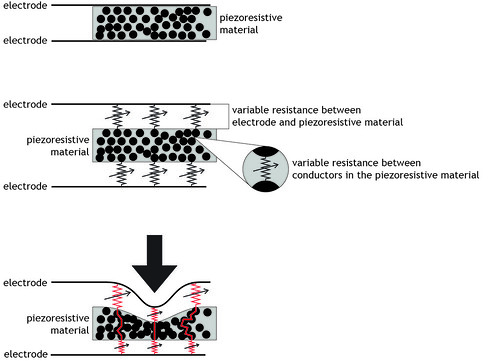
The How to Get What You Want site presents another interesting tutorial on piezoresistive sensors, various techniques to lay them out, and how to interface them to microcontrollers.

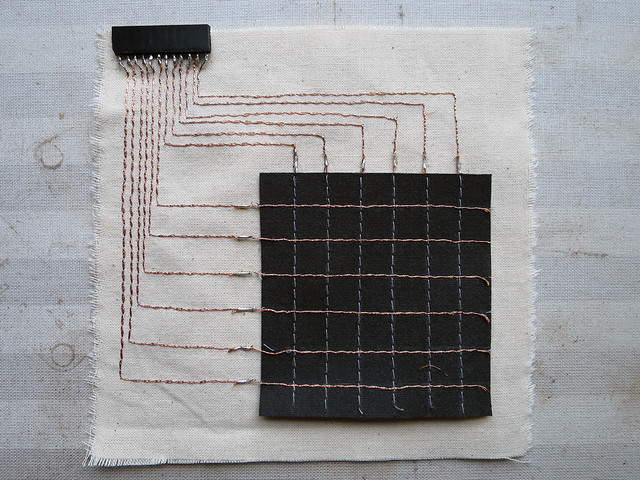
In this post I want to try and explain how a pressure matrix built from conductive rows and columns with a piezoresistive material (Eeonyx, velostat) in between works, how to wire it up to a microcontroller and write the Arduino code that will parse through the rows and columns to read the individual pressure points at each row/column intersection.

1) how a piezoresistive pressure sensor works
2) wiring matrix to arduino
3) the matrix code

The article uses some excellent Flickr drawings to illustrate piezoelectric properties.

Piezo/resistance

And how sensors may be woven to form a matrix

See the full article here and a demonstration video below.


How to Overclock the Raspberry Pi #piday #raspberrypi @Raspberry_Pi

via PiMyLifeUp

There aren’t any real best settings for overclocking your Raspberry Pi, and before we get started, we must warn that overclocking does void the warranty of your Pi. Overclocking can also create various problems with the device, so use it at your own risk.
Most projects don’t require you to overclock your Pi, but it can be beneficial for things such as gaming, servers, and other heavy software packages.

Read more.


3055 06Each Friday is PiDay here at Adafruit! Be sure to check out our posts, tutorials and new Raspberry Pi related products. Adafruit has the largest and best selection of Raspberry Pi accessories and all the code & tutorials to get you up and running in no time!